A dungeon level is a string of small choices: which door, which corridor, whether that plate in the floor is safe. The art has to make those choices readable at 16 pixels a tile, and the layout has to make them worth making. This guide covers the path through a floor, room shapes, doors and keys, traps the player can read, lighting and enemy placement, with the Godot 4 settings for each and examples from our dungeon packs.
Start with the path, not the tiles
Sketch the floor as boxes and lines before you place a single tile. Mark the entrance, the exit, the key, the locked door and one optional room with a reward. A floor that is one straight line of rooms gives the player nothing to decide. A floor where every room has four exits gives them nothing to remember. Good floors sit between the two: a main path, a loop or two and a few dead ends that pay off.
- One clear goal per floor: the stairs down, a boss door or an exit.
- A loop that brings the player back near the start, so the walk back with a key is short.
- Dead ends that hold something: a chest, a lever, a shortcut.
- A quiet room before the hardest fight, so the player can breathe.
If you want a first layout fast, generate one and edit it by hand. Our Dungeon & Map Generator makes dungeon maps from a seed and opens them in Tiled or Godot with collision and spawn points set, and dungeon generators for game developers compares the other options.
Room shapes that read on a small screen
Size rooms against your screen. At 16x16, a room of 10 by 8 tiles is 160 by 128 pixels, which fits inside a 320x180 view with room for the walls and the HUD. Vary the sizes: small rooms for traps and puzzles, big ones for fights, long corridors for tension. Vary the shapes too. An L-shaped room hides its far corner until the player turns it, and a pillar in the middle of a room gives the player something to circle around an enemy.
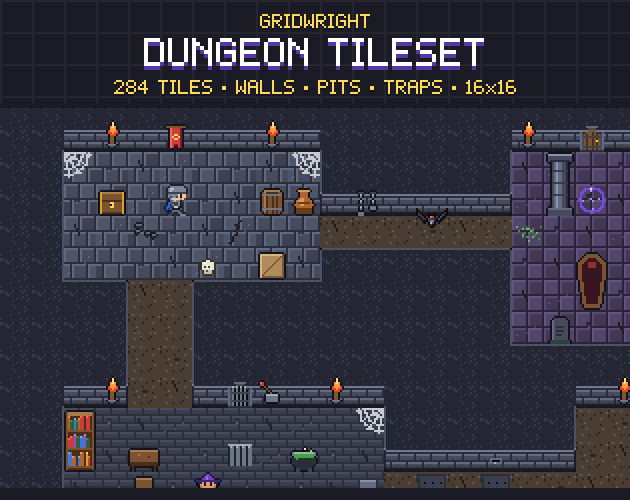
Walls do most of the work of making a room feel solid. A 47-tile wall autotile picks the right piece for every corner, edge and dead end from its neighbours, so you can paint rooms of any shape without fitting corners by hand. The Dungeon Tileset has 47-tile wall sets in three styles, stone brick, cave rock and crypt, with brick faces on the edges that look down the screen and dark tops. It also has a 47-tile pit whose far wall fades into the dark. How the blob set works, and when a smaller set is enough, is in 47-tile blob vs 16-tile corner sets.
Use the floor to tell areas apart. Switching from flagstone to dark brick or cave floor tells the player they have entered a new part of the dungeon without a word of text. Floor details such as cracks, rubble, bones, moss, a puddle, a grate or a rune circle break up big rooms. Keep them off the tiles where traps sit, though, or the player can't tell decoration from danger.
Doors, keys and stairs
Doors set the pace of a dungeon. A closed door hides the next room, a locked one sets a goal, and an open arch says there is nothing to solve here. Give each kind one meaning and keep it for the whole game.
The Dungeon Tileset's wooden door comes closed, open and locked, next to an iron portcullis, an empty arch, stairs up and down and trapdoors.
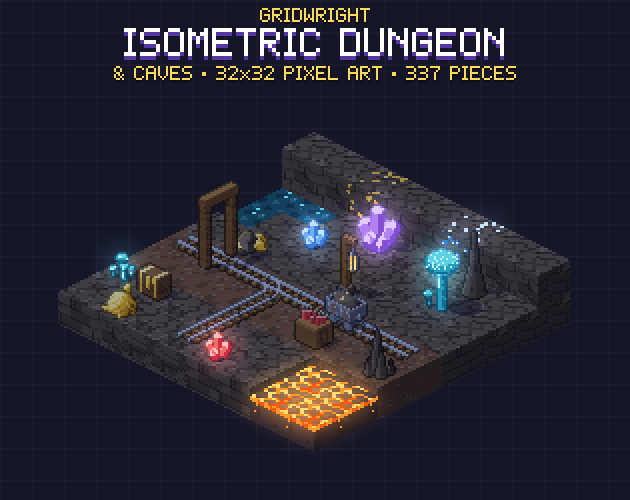
An isometric dungeon needs one more thing: walls that don't hide the player. Isometric Dungeon & Caves has full and cut-away wall pieces in cave rock, dressed dungeon stone and timbered mine walls, prison-cell bars, a wooden door, a barred cell door and a portcullis that rises in 4 frames, and dungeon stairs in 4 directions, all on a 32x16 diamond grid.
Traps the player can read
A trap is fair when the player can see it before it hurts them and can learn its timing after the first hit. Three rules cover most cases:
- Show the trigger. A pressure plate that looks like every other floor tile is a coin flip, not a puzzle.
- Show the timing. A spike trap or fire vent that animates on a steady rhythm lets the player wait for the gap and feel clever.
- Teach it somewhere safe. The first trap of a kind should sit where a hit costs little, before you mix it with enemies.
The Dungeon Tileset has levers, a pressure plate, an arrow trap, a spike trap and a fire vent. Isometric Dungeon & Caves adds a spike trap and a fire trap in 4 frames, pressure plates, a trapdoor shut and open, and a mimic chest that bites. The mimic is the one trap that is allowed to surprise the player, and it works best once per floor, after the player has opened a few honest chests.
In Godot, a trap is easiest as an Area2D over the tile with a CollisionShape2D the size of the dangerous part. Godot's reference describes Area2D as a region that detects other collision objects entering or exiting it, and its body_entered signal fires when a body steps in, which is where you start the damage and the sound. For danger that belongs to the floor itself, such as lava or spikes painted as tiles, a TileSet custom data layer can carry a value per tile. Godot's TileSet guide uses a damage_per_second value of 25 as its example, and your movement code can read it for the tile under the player.
Lighting: darkness that still plays
Darkness makes a dungeon feel like a dungeon, but the player still has to see walls, enemies and traps. In Godot 4 the usual setup has three parts. A CanvasModulate sets the ambient colour: Godot's page on 2D lights and shadows explains that without one, lights only brighten a scene that is already fully lit. PointLight2D nodes on the torches, braziers and candles bring light back where you want it. LightOccluder2D polygons, or occluder polygons drawn on solid tiles in a TileSet occlusion layer, let walls cast shadows once a light has shadows enabled.
- For pixel art, the shadow filter None gives hard, blocky shadows and is the fastest; PCF5 gives softer ones.
- Lights and shadows render at the viewport's resolution, so Nearest filtering on your textures won't make them pixelated. The same page shows a canvas item shader that snaps LIGHT_VERTEX and SHADOW_VERTEX to a grid if you want pixelated light.
- Keep the ambient colour dark but not black, so wall shapes stay visible between torches.
- Light every trap, or warn the player with a sound. A spike trap hidden in the dark is a cheap shot.
Light sources that move are worth their frames. The Dungeon Tileset's wall torch, brazier, candles and cauldron are animated. In Isometric Dungeon & Caves the lanterns, fire, lava, acid, crystals and glowing fungi use their own colours, so a simple darkening shader keeps them bright. We go deeper on light in 2D lighting for pixel art in Godot 4, and on fear in horror game maps in pixel art.
Enemies placed with the room in mind
Design rooms and enemies together. A slow slime suits a wide room where the player can circle it. A bat suits a corridor where it can't be walked around. A ghost suits a small room the player can't quite get out of. Place the first enemy of a kind where the player can watch it move before it reaches them.
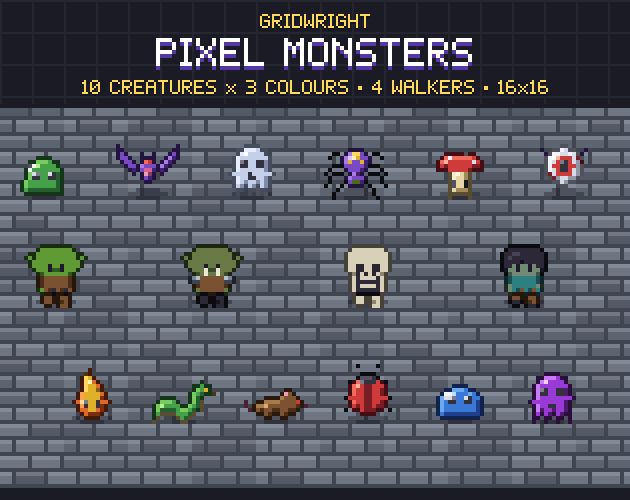
Pixel Monsters has 10 creatures in 3 colours each, the slime, bat, ghost, spider, mushroom, eyeball, snake, rat, beetle and wisp, each with a 4-frame move loop, a hurt frame and a 4-frame death. It also has four walking monsters, the Goblin, Orc, Skeleton and Zombie, in 4 directions with idle and walk. The three colours let a deeper floor bring back a known enemy as a stronger version without new animation, and the pack uses the same 16x16 grid and style as the Dungeon Tileset.
A dungeon level checklist
- The floor has one goal, at least one loop and dead ends that pay off.
- Rooms change in size, shape and floor tiles.
- Every kind of door keeps one meaning.
- Every trap shows its trigger and its timing, and the first one is safe to learn on.
- The ambient light is dark, torches and traps are lit, and walls cast shadows.
- Each enemy has a room that suits the way it moves.
The Dungeon Tileset, Isometric Dungeon & Caves and Pixel Monsters are on Gridwright, each bought once with a free sample to try first.
Gridwright packs can be used in commercial games; you may not resell the files themselves. Packs released from October 28, 2026 ask for a credit: “Art by Gridwright” with a link. The three packs here came out before that, so for them a credit is optional. More in can I use game assets in a commercial game.